

MooCowMan
Active Member
No Texture Glitch
For some of you guys with under-performing computers and internet.. I have a nice little tip for you. This may not be something you want to do but it helps a lot with Latency issues and Load times. You can remove the texture from your maps!
**Be sure to put it back in the folder before any patches!
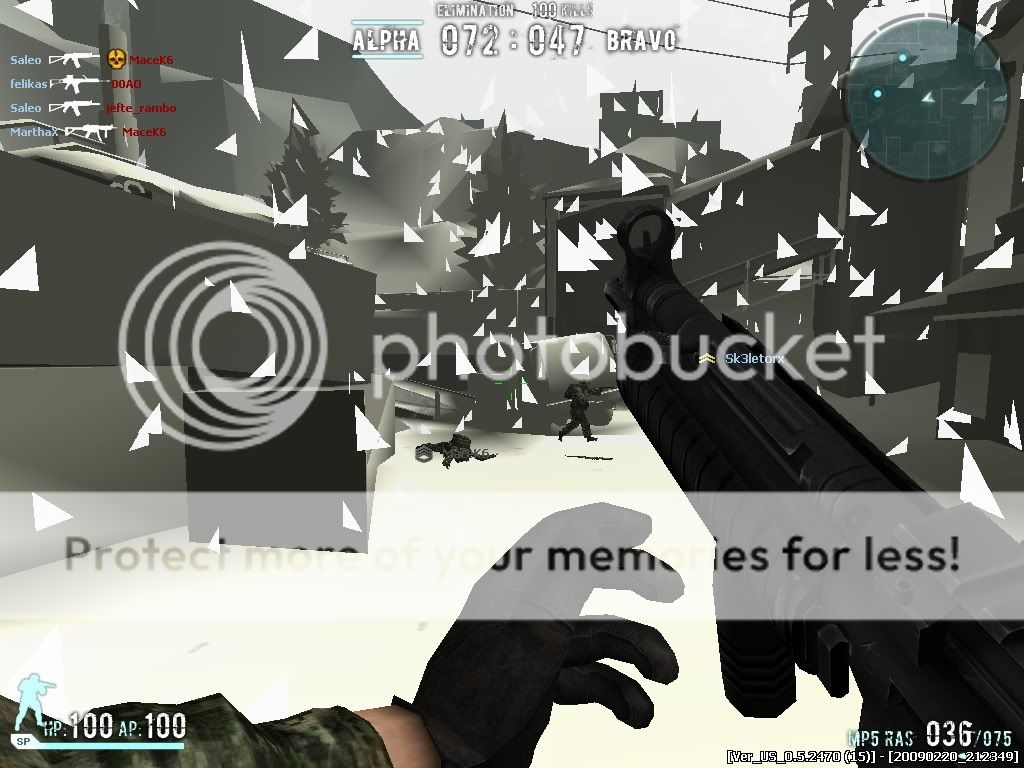
If you did it right it should look like this:
Pros:
Cons:
This will ONLY affect the maps, nothing is different, it will not change menu's or anything!
I hope this helps some people. No this will not screw up your game, I use this and It works fine for me.
For some of you guys with under-performing computers and internet.. I have a nice little tip for you. This may not be something you want to do but it helps a lot with Latency issues and Load times. You can remove the texture from your maps!
- Go to your Combat Arms folder.
- Go to the "Game" folder in your combat arms folder.
- Look for the file named "TEXTURES.rez"*
- Pull it out of the "Game" folder and put it on your desktop.** DO NOT DELETE IT!!!
- Start game and wallah!
**Be sure to put it back in the folder before any patches!
If you did it right it should look like this:
Pros:
- Faster Load Times. (Loads twice as fast)
- Less In Game Lag.
- Less Hit Box Issues.
- Easier to see other players.
Cons:
- Tree's and Bushes are Impossible to see past. (As seen in my picture)
- May get annoying to some people.
- Can be confusing if you don't know the map.
- Snow turns into triangles. (As seen in my picture)
This will ONLY affect the maps, nothing is different, it will not change menu's or anything!
I hope this helps some people. No this will not screw up your game, I use this and It works fine for me.


